
In this post
Plenty of companies keep the OSHA 300 log in a spreadsheet. It works until a case changes in March, a privacy case lands on the log with a name on it, or the online filing rejects the file.
This post covers what OSHA's recordkeeping rule asks of any system, paper, spreadsheet or software, where spreadsheets tend to slip, and the questions to ask before you buy something. It explains the rule. It isn't legal advice, so read 29 CFR 1904 itself.
OSHA allows a computer
29 CFR 1904.29(b)(4) says you can use an equivalent form in place of the 300, the 300A or the 301, if it has the same information, is as readable and understandable, and is completed using the same instructions. Under (b)(5), you can keep the records on a computer, if it can produce equivalent forms when they're needed.
The clock is the same either way. Under 1904.29(b)(3), a recordable case goes on the log within seven calendar days of learning about it.
What any system has to get right
One log per establishment. 1904.30 expects a separate log for each establishment expected to be open a year or more. A company with three sites keeps three logs, not one.
The recordable call is yours. Sections 1904.4 through 1904.7 set the test: work-related, a new case, and meeting the general recording criteria. A system can help you track that decision. It can't make it for you.
Days are calendar days. Days away and days of restricted work count calendar days, not workdays, and not the day of the injury. You can stop counting once the total reaches 180.
Privacy cases keep the name off. 1904.29(b)(7) lists the privacy concern cases, like an injury to an intimate body part or a sexual assault. For those, the log says "privacy case" in place of the name, and you keep a separate, confidential list that matches case numbers to names.
The 300A adds up the year. It totals the log and adds the average number of employees and the total hours worked. A company executive certifies it, under 1904.32(b)(3). It's posted from February 1 to April 30.
Employees can ask. Under 1904.35, an employee, a former employee or their representative can ask for the log, and you provide a copy by the end of the next business day.
Some establishments file online. Under 1904.41, establishments with 20 to 249 employees in certain industries, and all establishments with 250 or more, submit the 300A to OSHA by March 2. Establishments with 100 or more employees in a narrower list of industries also submit the 300 and 301 information.
Five years, and keep it current. 1904.33 says to keep the records for five years after the year they cover, and to update the 300 log during that time when a case changes.
Where spreadsheets slip
The name on a privacy case. Someone types it in the log, then the log gets printed for the break room.
Days that run past year end. A case from December keeps counting in January, and the old year's log needs the update.
The 300A arithmetic. One miscounted column and the summary doesn't match the log you certified.
The filing file. OSHA's Injury Tracking Application takes a CSV in a set layout, and the layout changes now and then. A file built by hand gets rejected, or worse, gets accepted with the wrong numbers in it.
The paper trail. The log says one thing, and the incident report that started the case lives in someone's inbox.
Questions to ask a vendor
- Does a case start from our own incident report, so the two stay tied together?
- Can we mark a report not recordable, and keep the reason?
- Does it keep a separate log for each establishment?
- Does it count calendar days and stop at 180?
- How does it handle privacy cases, and who can see names?
- Does it produce the 300, the 300A and the 301 as PDFs on OSHA's current forms?
- Does its filing CSV match OSHA's current template, and does it check the file before we upload it?
- Does it file with OSHA for us? If so, who's responsible for what gets filed? If not, what's the step?
- How long does it keep the records, and can we get them out if we leave?
Where PortalBase fits
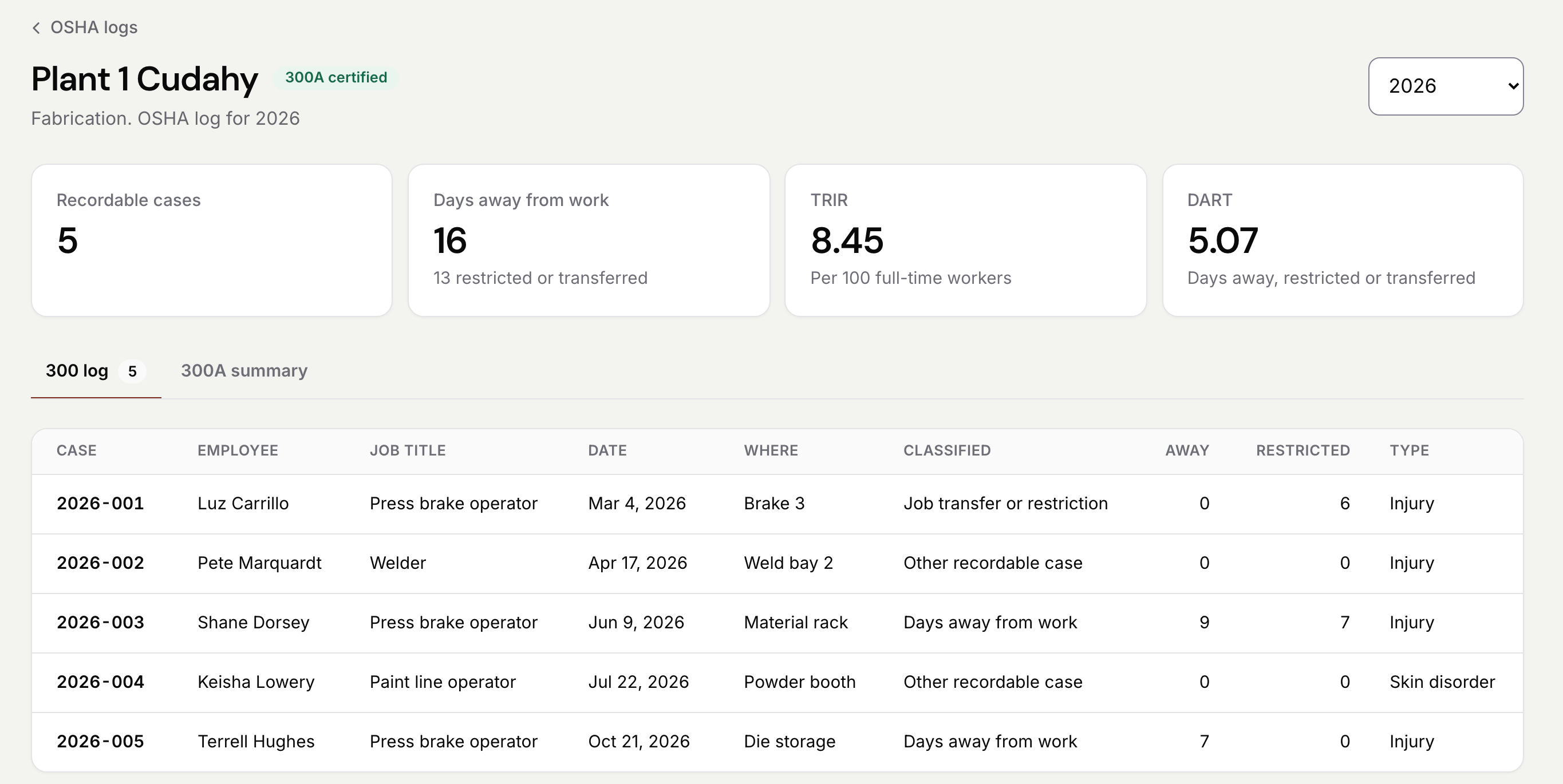
In PortalBase, the 300 log and the 300A are in Reports, by establishment, built from your incident reports. You decide which cases are recordable and certify the year. Privacy cases keep the employee's name off the log, and only people with OSHA access see names.
There's a 301 for each case, and PDFs of the 300, the 300A, the 301 and the privacy case list on OSHA's current forms. You get CSV files for OSHA's online filing, which you download and upload yourself. PortalBase doesn't file with OSHA for you, and it doesn't decide what's recordable. See it at portalbaseai.com/products/safety-and-incidents.
If you're not ready for software, start with the free log at portalbaseai.com/tools/osha-300-log-template and the worksheet at portalbaseai.com/tools/osha-300a-worksheet.
Sources
29 CFR 1904.4 to 1904.7, 1904.29, 1904.30, 1904.32, 1904.33, 1904.35 and 1904.41, at ecfr.gov.
OSHA's Injury Tracking Application, at osha.gov/injuryreporting.
This post explains the federal rule. It isn't legal advice. States that run their own OSHA plans can set rules that differ, so check yours.