
Workflow builder for frontline teams: When this happens, do that. Every time.
A critical step fails, and the machine comes out of service and the manager hears about it right away. A permit request goes to two people in turn. Build it once as a flow of steps, try it on last week's records, and publish it.
Also calledWorkflow automation, Approvals, Escalations, Permit requests

Used in
The solutions that put this product to work.
Build a workflow, test it, watch it run
Build the steps as a flow.
Steps run down the page, and a decision splits into its answers side by side. Add a step with the plus, test run it, then publish. Start from one of five, or from blank.

Start it when something happens.
A workflow can start when an inspection is submitted, work goes overdue, a training is finished, someone is added, an incident report comes in, a meter passes a number, or a certification is about to run out. Here, a certification that ran out.

Describe a workflow and it draws the flow.
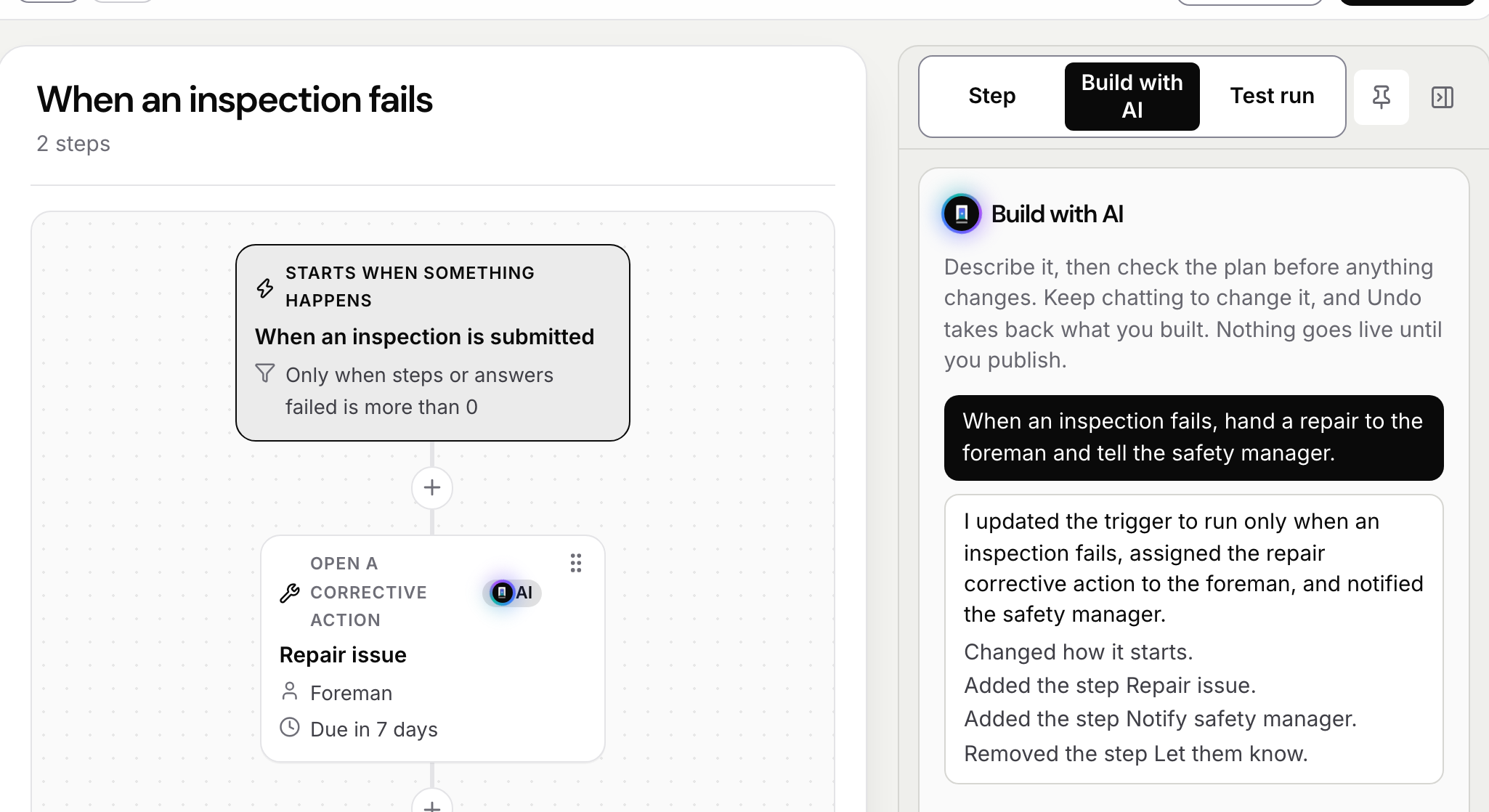
Say what should happen when an inspection fails and the steps appear in the builder, marked as AI-made. You test run it, then publish.
See every run, step by step.
Each run of each workflow, where it is, who started it and what it's waiting on.

Sample data from our own demo company.
How it starts
By hand, on a schedule, or when something happens.
01
When something happens
An inspection or a form is sent, work goes a day overdue, a certification runs out, a fix is recorded, someone is added, a meter passes a number. Add a condition, like only when a critical step failed.
02
On a schedule
How often, what time on the site's clock, and which days.
03
By hand
From Today and the Requests tile. You pick who can start it, and whether they say what it's for.
Steps
What a step can do.
Hand out work. A task, a form, an inspection, a training or something to sign, to a person, a role or a pool.
Ask someone to decide. Each answer goes down its own path. Steps can also run side by side.
Tell people. By push, text or email, with words from the record. Or send an announcement they sign.
Open a corrective action. Or take equipment out of service, grant a certification or hand out a learning path.
Wait, then act. Give a step a time limit. If nobody acts, hand it up to the next manager, skip it or stop the run.
Reach other systems. Send the record to one of your webhooks, or start another workflow.
Build it
Start from one of five, or from blank.
Every company gets five to start from: a critical step fails, a permit request, overdue work goes up, a certification runs out, and a weekly safety walk.
Step 1
Lay out the steps
Add a step at any +, drag it to move it, and undo what you didn't mean.
Step 2
Test run it
Run it against a real record from the last 60 days. It shows every step and who each would go to. Nothing is sent and nothing changes.
Step 3
Publish it
It won't publish until what's marked on the cards is fixed. Change it later and new runs use the new version.
Build with AI
Say it in a sentence. Check the flow it draws.
AI drafts it. Type what should happen, like when an inspection fails, hand a repair to the foreman and tell the safety manager. The steps appear in the builder.
A person publishes it. Nothing goes live on its own. You test run it, change what's wrong and publish.
Runs
See where every run is.
- Step by step. Who each step went to, what they did and what's next.
- Going or ended. Filter by workflow, place or person.
- Cancel one. Say why. Whoever started it sees the reason, and work it handed out that isn't done is cancelled too.
Questions
- Do I need to write code?
- No. You build it on the web by adding steps and picking who each one goes to. Build with AI can draft it from a sentence.
- Can I try a workflow before it goes live?
- Yes. A test run plays it against a real record from the last 60 days and shows every step it would take and who each would go to. Nothing is sent and nothing changes.
- What happens when I change a published workflow?
- Your changes are a draft until you publish them. You can throw the draft away and go back to the published version. Once you publish, new runs use the new version.
- Who does a step go to?
- A named person, whoever holds a role at that site or above, whoever manages work there, the person on the record that started it, whoever started it, a pool to claim, or a group.
Tell us what happens after an inspection fails.
Who gets called, who fixes it, who signs it off. We'll build that workflow with you in a walkthrough.
Book a walkthrough