Skip to content

From PortalBase. Sources checked November 10, 2026

GoCanvas alternatives, from PortalBase.

GoCanvas calls itself a frontline operations platform, and we compare it with PortalBase on its own page. This list is ours, so PortalBase comes first, with the reasons. The other tools follow A to Z, each described only by what its own pages say.

Why PortalBase leads this list.

One system, one record.

Training, forms, inspections, safety records, corrective actions and communications share one list of people. A failed step opens a repair.

Training that proves itself.

Bring in PDFs, slide decks and SCORM courses. Add quizzes and sign-offs, and certifications alert before they lapse.

OSHA logs from your records.

The 300, 300A and 301 come from your incident reports as PDFs, with the CSV for OSHA's ITA. You review and file.

AI built in, and yours connects.

PortalBase AI answers from your own documents and drafts forms and trainings. Claude, ChatGPT or Copilot connect, acting only as the person who signed in.
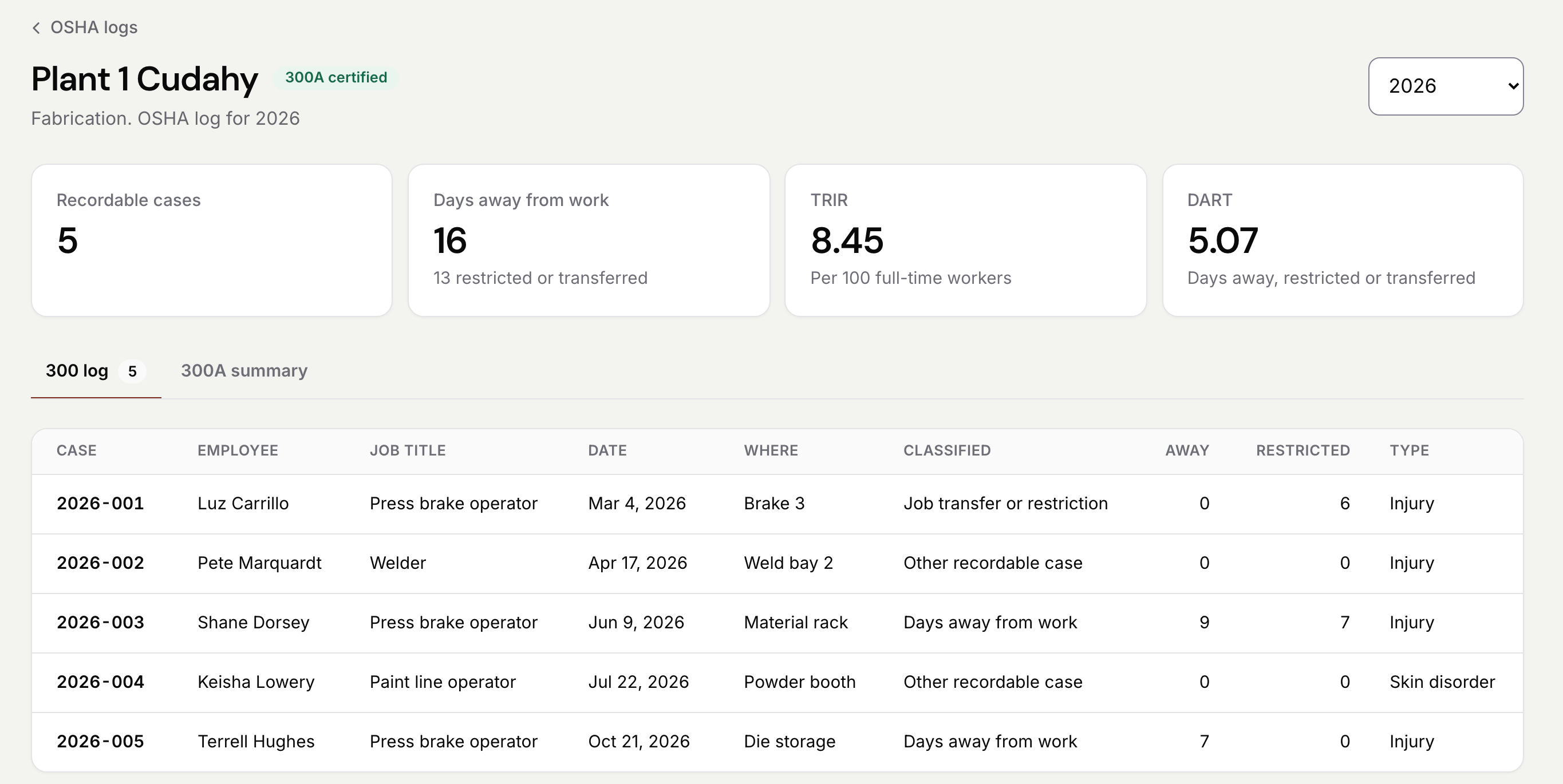
The OSHA 300 log for Plant 1 Cudahy, a made-up demo plant, marked 300A certified: tiles for 5 recordable cases, 16 days away, a TRIR of 8.45 and a DART of 5.07, then the five cases with case number, employee, job title, date, where, how it was classified, days away, days restricted and type.

What we already do better.

Signed in for 30 days with no signal.

After one sign-in with signal, people stay signed in for 30 days with no signal at all. Training, forms and inspections keep working the whole time.

Saved the moment it's done.

Work saves on the phone the moment it's done, and sends itself when signal is back. Nobody has to press sync.

One app for training, inspections and forms.

Teams do their training, inspections and forms in one app, with one sign-in and one record for each person.

The list.

PortalBase first, because this list is ours. The rest follow A to Z, each described only by its own pages.

PortalBase

ours
  • The AI-native platform for frontline teams: training, forms, inspections, safety records, corrective actions and communications, in one app and one web app.
  • Native iOS and Android apps. Training, forms and inspections work with no signal and sync when the phone is back in range.
  • Sign-in by company single sign-on, a text code, an employee ID and PIN, or a QR badge on a shared device. English and Spanish.
  • PortalBase AI answers from your documents and records, and drafts forms, trainings, workflows and dashboards for a person to publish (needs signal). PortalBase is listed in Claude's connector directory and ChatGPT's app directory. Microsoft 365 Copilot connects too. Each connection acts only as the person who signed in.
  • A demo built for your company, before you decide.

Lumiform

What its own page says

  • Describes itself as specialized software for businesses with frontline teams to run inspections, audits and checklists at scale.[1]
  • Lists a form builder, mobile app, actions, workflow automation, approvals, reports and analytics.[1]
  • Says it offers full offline capture, syncing the moment there's a connection.[1]

Not stated on the page we read

  • Which languages the app supports.

Mitti (formerly SafetyCulture)

What its own page says

  • Calls itself the operations system for every site, shift and standard.[2]
  • Lists inspections, training, task management, communications, issue reporting and document management.[2]
  • Says checks work on any device, online or offline, with offline syncing.[3]

SiteDocs

What its own page says

  • Calls itself safety management software, with the headline "Safety Compliance Made Easy".[4]
  • Lists digital forms, inspections, incidents, corrective actions, hazard management, worker orientation and certification management.[4]
  • Says forms upload automatically once you're back online.[4]

“Not stated on the page we read” means just that. It doesn’t mean they don’t. Checked November 10, 2026.

Ask every vendor.

  1. 1Does it run training and certifications as well as forms?
  2. 2What happens when a step fails: is there a repair or a corrective action with an owner?
  3. 3Can people with no company email sign in, and how?
  4. 4Does the AI answer from your own documents?
  5. 5Will they build a demo with your own work in it before you decide?

Ask every vendor the questions above. Then ask us for a demo built for your company, with one of your own forms in it.

Sources, checked November 10, 2026

  1. Lumiform home page, lumiformapp.com, read November 10, 2026
  2. Mitti home page, mitti.com, read November 10, 2026
  3. Mitti inspections and reports page, mitti.com, read November 10, 2026
  4. SiteDocs home page, sitedocs.com, read November 10, 2026

Everything we say about another company comes from its own pages, read on the day shown. “Not stated on their site” means just that. See something wrong or out of date? Tell us at hello@portalbaseai.com and we’ll fix it.

See it with your own work in it.

Tell us your sites and the checks you run. We'll send a demo built for your company and show it on a phone with no signal.

Common questions

What is GoCanvas?
Its own page calls it a frontline operations platform, built on forms and workflows connected to business systems. We compare it with PortalBase on its own page.
Can I move my forms over?
PortalBase AI drafts a form from a sentence, or from a photo of the form you use now. A person checks it and publishes. Bring one of yours to a walkthrough.